What the Product Remembers
I wanted to see what survives when connectivity disappears during a task, so I deliberately created that failure in a few products.
I started with Sarvam Akshar, a document digitisation product that can extract structured information from uploaded documents.
I selected a document, took the browser offline, and clicked Extract.
Failed to fetch.
What caught my attention wasn't only the error. The document was still there. The preview was still there. So were the extraction settings. When I restored the connection, nothing restarted by itself, but I could press Extract again without selecting the file or setting anything up again. The project submitted normally.
The error message had told me very little, but I had almost nothing to redo.
That made me wonder whether I had been looking at failure too narrowly.
I tried similar interruptions across five more products: Dropbox, Google Drive, OneDrive, Gemini and ChatGPT.
They were not all the same experiment. Drive, Dropbox and OneDrive were interrupted during active file uploads. In Sarvam, Gemini and ChatGPT, a document had already been selected or attached and I interrupted the next action. For most of the later tests, I restored connectivity and waited 30 seconds before touching anything to see whether the product would recover without me.
Six products, mostly one run per condition, one browser and two different kinds of task do not make a benchmark ofc. 😂
But they were enough to make “good error handling” feel like a very blunt description of what was happening.
The message and the recovery were doing different jobs
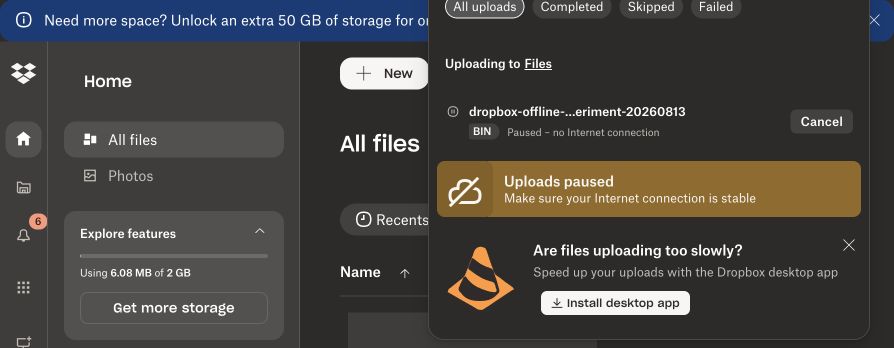
Dropbox made the network problem explicit. When I interrupted a large upload, it changed the state to:
Paused – no Internet connection
It also told me that uploads were paused and asked me to make sure the connection was stable. The file stayed in place. When connectivity returned, the upload continued without me doing anything.
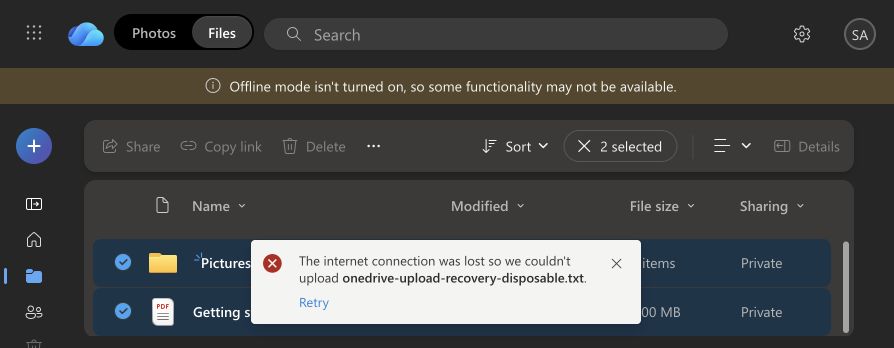
OneDrive also identified the problem clearly:
The internet connection was lost so we couldn't upload…
The selected file and destination remained available there too. But restoring connectivity did not restart the upload during the 30 seconds I watched it. The failed task stayed on screen with Retry. I clicked it once, OneDrive did not ask me to select the file again, and the upload eventually completed.
Sarvam behaved differently again. Failed to fetch did not identify the lost connection or give me an explicit next step, yet the document and extraction setup had survived. Recovery still amounted to clicking Extract once more.
So in these tests, the quality of the explanation, how much of the task survived, and who had to take the next action did not move together.
Dropbox explained the problem and carried on by itself. OneDrive explained it and waited for me. Sarvam explained much less but left me with almost nothing to rebuild.
That seemed more useful than trying to decide which one was simply “better at errors.”
Keeping the text wasn't necessarily keeping the task
The document experiments made “did it save my work?” harder to answer.
A file upload has fairly obvious visible pieces: a file, a destination, some progress and the upload itself. A document-backed AI request can have several things tied together: the document, the prompt, perhaps some settings, the conversation, and the request connecting them.
Gemini kept some of those pieces and not others.
I attached a PDF and typed:
Give me a one-sentence summary of this document.
Then I submitted while the browser tab was offline. When I later captured the failed state, the prompt was still there but the attachment was not. Restoring connectivity did not visibly recover the task during the 30-second window.
I pressed Send again without rewriting the prompt. Gemini replied that the document had not been included.
The text survived.
The task didn't.
So preservation was not really a yes-or-no question. A product could keep one input while losing enough of the surrounding context that the original task could no longer continue.
ChatGPT exposed another version of this.
I attached a disposable PDF in a temporary chat on a Free account and submitted a similar request while offline. ChatGPT showed:
Something went wrong. If this issue persists please contact us through our help center…
It did not identify connectivity as the cause. But immediately after the failure, both the prompt and the PDF attachment were still visible. There was also a Retry button.
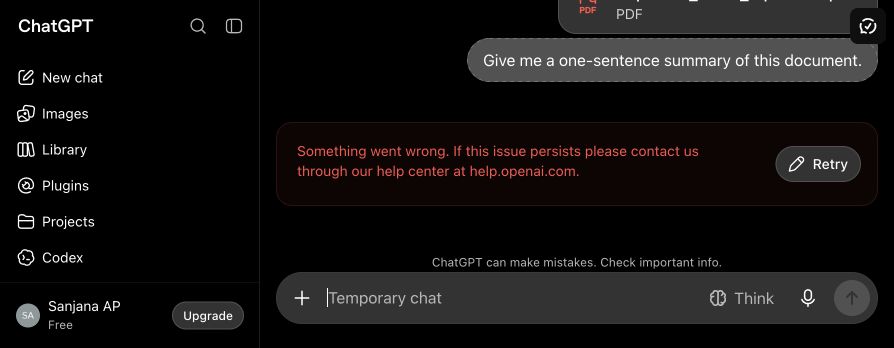
I restored connectivity and waited 30 seconds. Nothing visibly recovered, so I pressed Retry. The retry failed, and the resulting state was now different: the prompt returned to the composer, while the attachment disappeared.
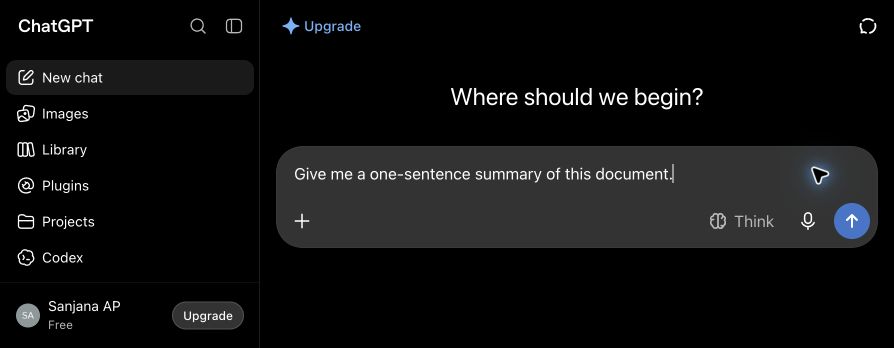
Before Retry:
prompt: Yesattachment: Yes
After Retry:
prompt: Yesattachment: Nope
This was probably the most useful thing I saw in the whole experiment, not because one failed Retry tells us how ChatGPT generally behaves. It doesn't.
What mattered was the transition.
I had been looking at what existed before a failure and what remained afterward. This made me notice another moment: what remains after the attempt to recover.
In this test, I had more of the original task available before pressing Retry than afterward.
That made the button itself worth thinking about. When a product says Retry, what exactly is being retried? And what does it carry into that second attempt?
Google Drive made the experiment itself part of the story
Drive gave me a different problem.
The first time I tested it, I interrupted an active upload by switching off my Mac's actual Wi-Fi. When Wi-Fi returned, Drive continued uploading automatically. I later repeated the same kind of real Wi-Fi interruption and saw the same broad behaviour: no Retry and no file re-selection.
Then I tried to make the experiment more controlled. Instead of disconnecting the whole computer, I used Chrome DevTools to make only the Drive tab offline.
This time Drive showed:
You are offline. Some functionality may be unavailable.
The upload moved into:
Upload failure (38)
with a Retry button.
I restored the tab's connection and waited. The offline banner disappeared, but the upload stayed failed beyond the 30-second observation window. I had to press Retry.
Then the progress display became strange. It initially showed 75%, dropped to 34%, and later climbed again until the upload completed.
I don't know what happened underneath those percentages. Maybe some data was sent again. Maybe Drive recalculated progress. Maybe previously transferred data had not yet been confirmed. I did not inspect the underlying network requests, so the percentage alone cannot tell me what was actually retained or retransmitted.
That discrepancy matters more than deciding which result is the “real” one.
With actual Wi-Fi loss, I observed automatic recovery twice. With Chrome's simulated Offline mode, the upload entered a failed state and waited for Retry.
Same product. Similar interruption from my side of the screen. Different way of producing it. Different outcome.
So my test method was not neutral.
That means I cannot fairly summarize the finding as either “Drive automatically recovers from lost connectivity” or “Drive requires Retry after lost connectivity.”
And that was a useful warning for everything else I had just tested.
Apple's current Human Interface Guidelines say interfaces should make recovery easy and that recovering from unexpected situations shouldn't cost people their time or work.
WCAG 2.2 approaches a related issue from an accessibility angle: within the same multi-step process, information somebody has already provided and needs again should generally be filled in or made available for selection, subject to specific exceptions.
So “don't unnecessarily make people rebuild what they already did” isn't a new insight.
What the experiments changed for me was how vague the word work had been.
Was it the file? The prompt? The attachment? The settings? The upload progress? The failed action? Or the connection between those pieces that made them one task?
Gemini kept my sentence but not the document it depended on. ChatGPT initially kept both, then lost the attachment during the recovery attempt. OneDrive kept the file but left the next action to me. Dropbox kept the upload and took the next action itself.
Those are different experiences even before judging the wording of the error message.
Automatic recovery isn't always the obvious answer
Dropbox continuing by itself felt effortless in this particular test. That doesn't mean every failed action should automatically be repeated.
A file upload is one thing. An action that sends money, places an order or creates something can be different. If the connection disappears at the wrong moment, repeating an operation without knowing whether it already succeeded can create the same thing twice.
Stripe's API is a useful example. It supports idempotency keys, which let a client safely repeat certain requests after a connection failure without accidentally performing the same operation twice.
So “recover automatically” is not a useful universal rule either.
The better question is whether the product can safely recover for me. If it cannot, asking me to confirm the next attempt may be entirely reasonable.
My browser tests cannot tell me why each product made its choice. I didn't inspect their internal systems.
I can only see what happened to the task and what I had to do next.
What I'd look at now
If I looked at another failure flow tomorrow, I wouldn't start by asking whether the error message was “good.”
I'd ask simpler questions.
What happened?
Did the product give me enough information to understand the failure?
What stayed?
Which pieces of what I had already done were still usable?
Who had to do the next thing?
Did the product continue on its own, or was the next move mine?
What did I have to redo?
Nothing? A click? A file selection? An attachment? The whole task?
Was it still the same task afterward?
Once recovery happened, were the pieces I needed still connected?
I wouldn't turn those questions into a scorecard from these experiments. There are too many limits.
Most conditions were tested once. Sarvam had a shorter wait after reconnecting than the later tests. ChatGPT was tested once in a temporary chat on a Free account. I did not inspect request-level network traffic. And an interrupted Dropbox upload is ofc not the same kind of task as an interrupted AI request involving an attached document.
Drive gave me the clearest warning: even “make the connection disappear” did not produce one consistent failure path.
So I don't know whether AI products generally preserve less context, whether older products recover better than newer ones, whether company size explains anything, or what technical choices underneath these products produced the differences I saw.
These experiments don't answer those questions.
They changed a smaller thing: what I look at when something fails.
I still read the error message. Now I also look at what remains around it: whether the file is still there, whether the prompt still has the document it refers to, whether the product kept enough for me to continue, and how much I have to rebuild.
And if I press Retry, I want to know whether I'm retrying the task I started or only what is left of it.
The error message is one part of failure. What the product remembers is another.